

The SEO Debt I Let Build Up
I didn’t stop caring about SEO. I just stopped staying on top of it. That’s the part people skip when they talk about WordPress SEO. Most sites do not fall apart because the owner suddenly decides search traffic does not matter. They fall apart because the work gets boring, the site keeps growing, and the cleanup keeps getting pushed to “later.”
That was me for six straight months. I published new posts. I updated a couple of pages when offers changed. I swapped images when something looked stale. Every now and then I opened Rank Math, fixed one or two obvious issues, and told myself I was still basically managing it.
I wasn’t. What I was really doing was spot-fixing the newest problems while old ones piled up in the background. A post with a weak meta description. A service page I’d edited twice but never reranked. Images with missing alt text because I uploaded them fast and moved on. Bits of SEO metadata that were not technically empty, just clearly written in a hurry.
I think most WordPress SEO problems are maintenance debt, not content quality. If your site has decent content but the archive has been neglected for months, the real problem usually is not “I need a smarter strategy.” It is “I have too much half-finished cleanup work.” I tried pretending otherwise. I did occasional manual sweeps. I’d fix three posts, get distracted, and disappear again for two weeks. The site stayed alive, but it definitely was not healthy.
Why I Finally Ran a WordPress SEO Audit
The reason I finally ran the scan was simple: I had changed a few important pages and could not remember what else I had quietly broken. That was the moment I stopped wanting another checklist and started wanting a proper WordPress SEO audit tool. Not something that would tell me “good luck, there are issues,” but something that would scan the whole site and show me what actually needed attention first.
That is where vLake made sense to me. I connected it, set the SEO threshold, and let the recommendation engine do the first pass across blogs, pages, and media. My expectation was honestly pretty modest. I thought it would surface a few weak posts, some missing metadata, maybe a handful of images I’d forgotten about.
The first scan was much more revealing than that. It also forced me to admit something uncomfortable: I had been using “the site is probably fine” as a substitute for actually checking it.
What vLake Found on My WordPress Site
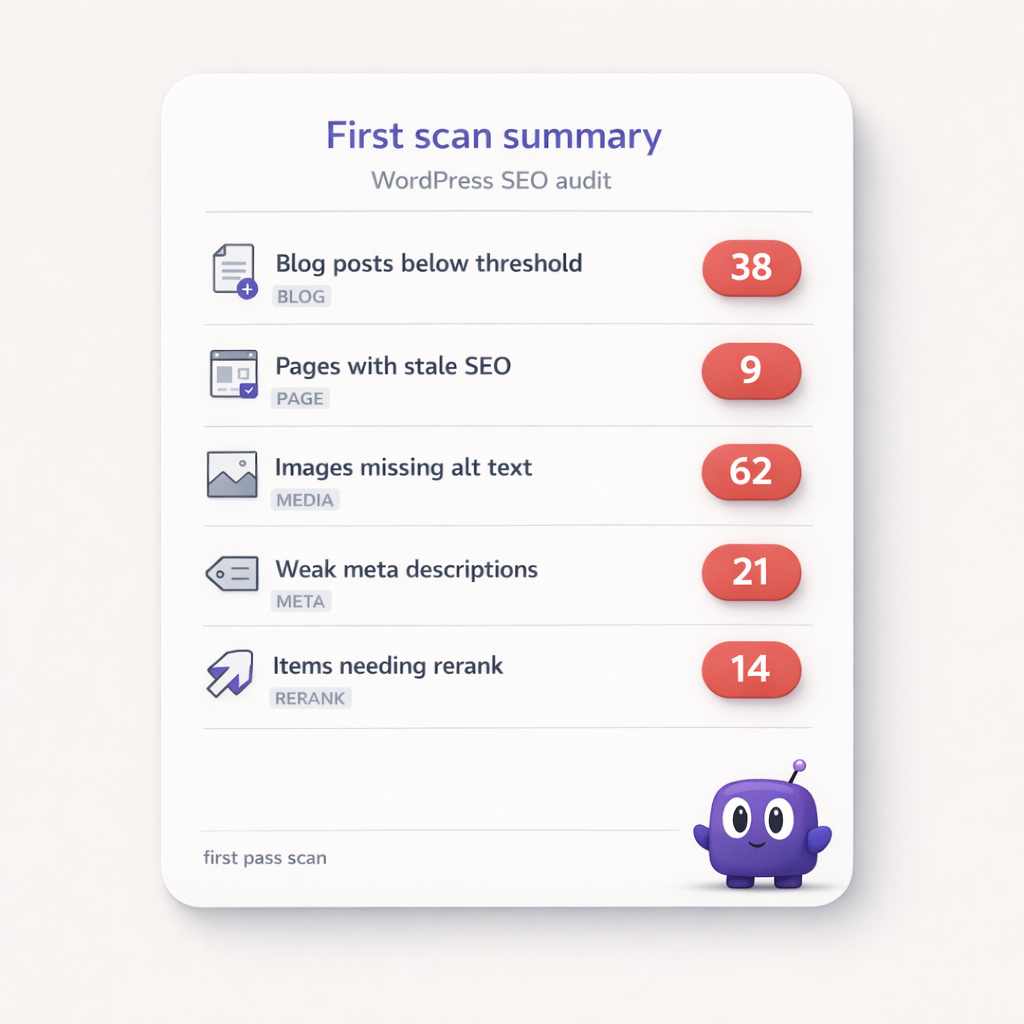
The scan did not find one dramatic disaster. It found a backlog. That was worse.
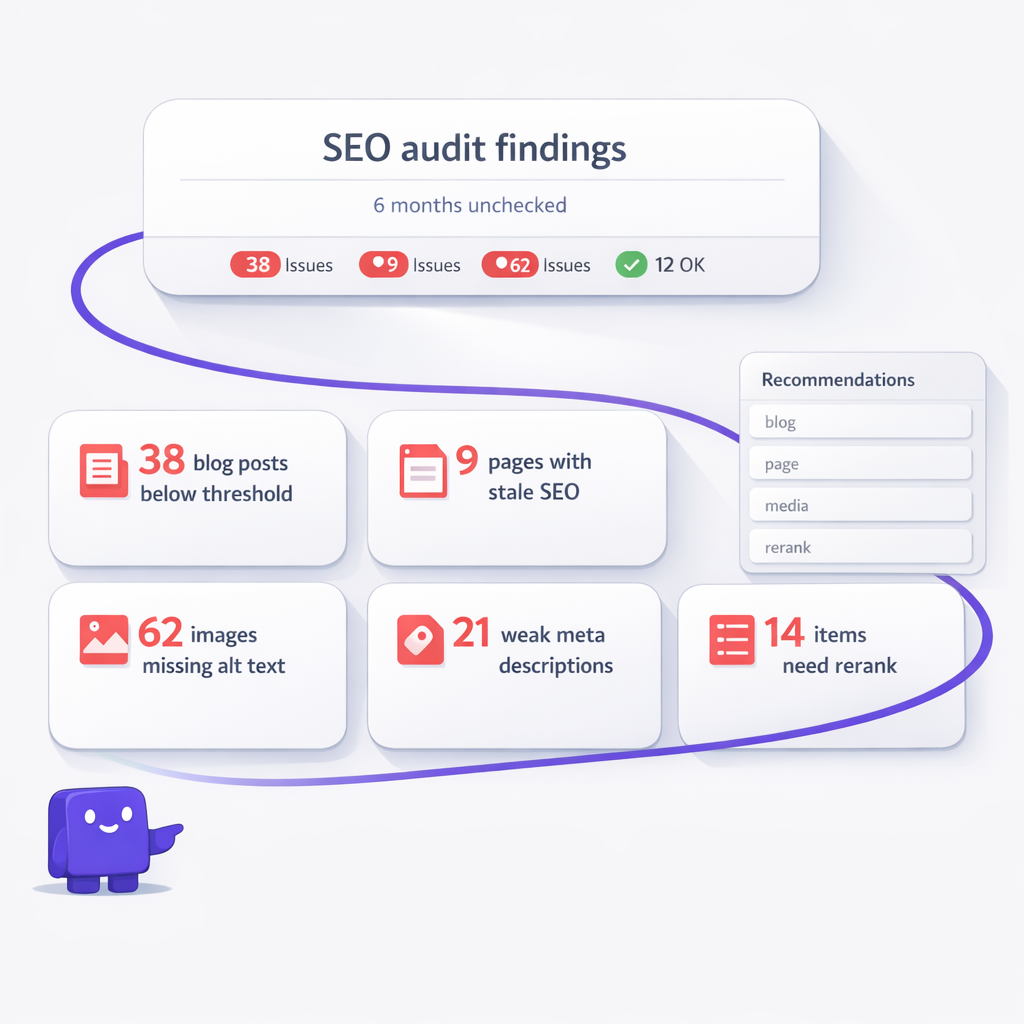
Here is what vLake surfaced on the first pass:
- 38 blog posts below my SEO threshold
- 9 pages with weak or stale SEO
- 62 images missing alt text
- 21 posts with missing or weak meta descriptions
- 14 pieces of content that needed reranking after edits
Those numbers changed how I thought about the site immediately. I was expecting the blog archive to be the main issue. It was not. What caught me off guard was how many older pages and forgotten images had quietly become part of the problem. The recent blog posts were messy, sure, but the older site content was worse (which, honestly, I should have guessed).
vLake broke that backlog into something I could finally read. Low-scoring content was flagged. Weak metadata was surfaced. Media SEO gaps showed up next to post and page issues instead of living in some separate mental bucket I never got around to checking.
The only part that did not feel good was the first recommendation queue. It looked overwhelming at a glance. My first mistake was treating every issue like it carried the same urgency. Once I stopped doing that, the whole thing became usable. That mattered. Because a big queue is only helpful if it tells you what to fix first.
What I Fixed First After the Audit
I did not start with everything. I started with the quickest, highest-value cleanup I had been avoiding for months.
- First: the 21 posts with missing or weak meta descriptions. That was the most obvious place to let vLake help immediately. It generated Rank Math-compatible focus_keyword, seo_title, and seo_desc fields for the pieces that were dragging my scores down. I reviewed the first batch because AI-written SEO can get repetitive if you never look at it. A few early suggestions felt a little too similar, so I tightened up what I approved and moved on.
- Second: the 9 stale pages. Those were more important than they looked because they were pages I had already edited manually. vLake flagged them, the metadata got refreshed, and the needsRerank flow made sure the scores were recalculated after the updates. That was one of the most useful parts for me. I did not have to guess whether the cleanup actually changed the score. The workflow closed the loop.
- Third: the media backlog. I did not obsess over every image on day one, but I did let vLake work through the missing alt text problem because 62 neglected images is exactly how small SEO issues turn into permanent site debt.
After two weeks, here is where things stood:
- Before the audit
- – Average SEO score: 52
- – Missing or weak meta descriptions: 21
- – Pages below threshold: 9
- – Images missing alt text: 62
- – SEO cleanup habit: random, ad hoc, easy to ignore
- Two weeks later
- – Average SEO score: 76
- – Missing or weak meta descriptions: 0
- – Pages below threshold: 2
- – Images missing alt text: 7
- – SEO cleanup habit: short review passes instead of random catch-up sessions
That is the part I think matters most. The win was not some magic ranking jump. The win was going from vague guilt and random cleanup to a real queue, real fixes, and visible movement.
What This Means If Your SEO Has Been Sitting Untouched
If you have not looked closely at your WordPress SEO in months, I would bet the problem is broader than whatever post you published last week. It is probably old pages. It is probably media you never fully cleaned up. It is probably edits you made months ago that changed the content without changing the metadata. That is why I think a sitewide scan matters more than heroic one-off fixes inside the editor.
If you run one business site, this gives you a way to stop guessing. If you manage several sites, it is even more useful because backlog multiplies fast. And if you are still telling yourself your site is “fine enough,” I get it. I said the same thing for six months. It was fine enough right up until I finally measured it.
What vLake Found
I did not have a WordPress SEO strategy problem. I had six months of quiet backlog, and the scan was the first thing that made it visible.