

Why I Stopped Doing WordPress Plugin Updates Manually
We used to do plugin updates manually. Every few weeks, someone would log into a client’s WordPress admin, see the red badge on the plugins page, and work through the list one by one. Update. Reload. Check nothing broke. Update the next one. It felt like responsible maintenance.
It wasn’t. It was reactive maintenance at best, and a liability at worst. And it was the kind of task that sounds quick until you’re managing more than two sites.
The Real Problem With Manual Plugin Updates
Here’s the thing about plugin updates that nobody tells you upfront. The risk isn’t in updating. The risk is in not updating, and then updating everything at once three weeks later after ignoring it.
When you update plugins one at a time, consistently, the chance of a conflict is low. Each update is small. You know what changed. If something breaks, you know which plugin caused it.
When you defer updates for three weeks and then batch them all at once because you finally have an hour, you have no idea what caused the breakage. You just know your client’s site is showing a white screen and you’re rolling through change logs trying to figure out which of the seven plugins you just updated introduced the conflict.
We’ve been there. It’s not fun.
But the other failure mode is worse. Just not updating at all. Plugins sitting two or three major versions behind, some with known security vulnerabilities that were patched in newer releases, sitting on live sites because nobody had the time or the confidence to touch them.
We audited one of our client sites early on and found a plugin that hadn’t been updated in fourteen months. It had a CVE filed against the version they were running. The client had no idea. We had no idea until we actually looked.
Manual maintenance fails in both directions. You update in batches and break things. Or you don’t update and accumulate security risk. Neither outcome is good, and both happen because the task depends on someone remembering to do it at the right time, in the right order, with enough time to deal with the consequences.
What We See Across Every Site We Connect
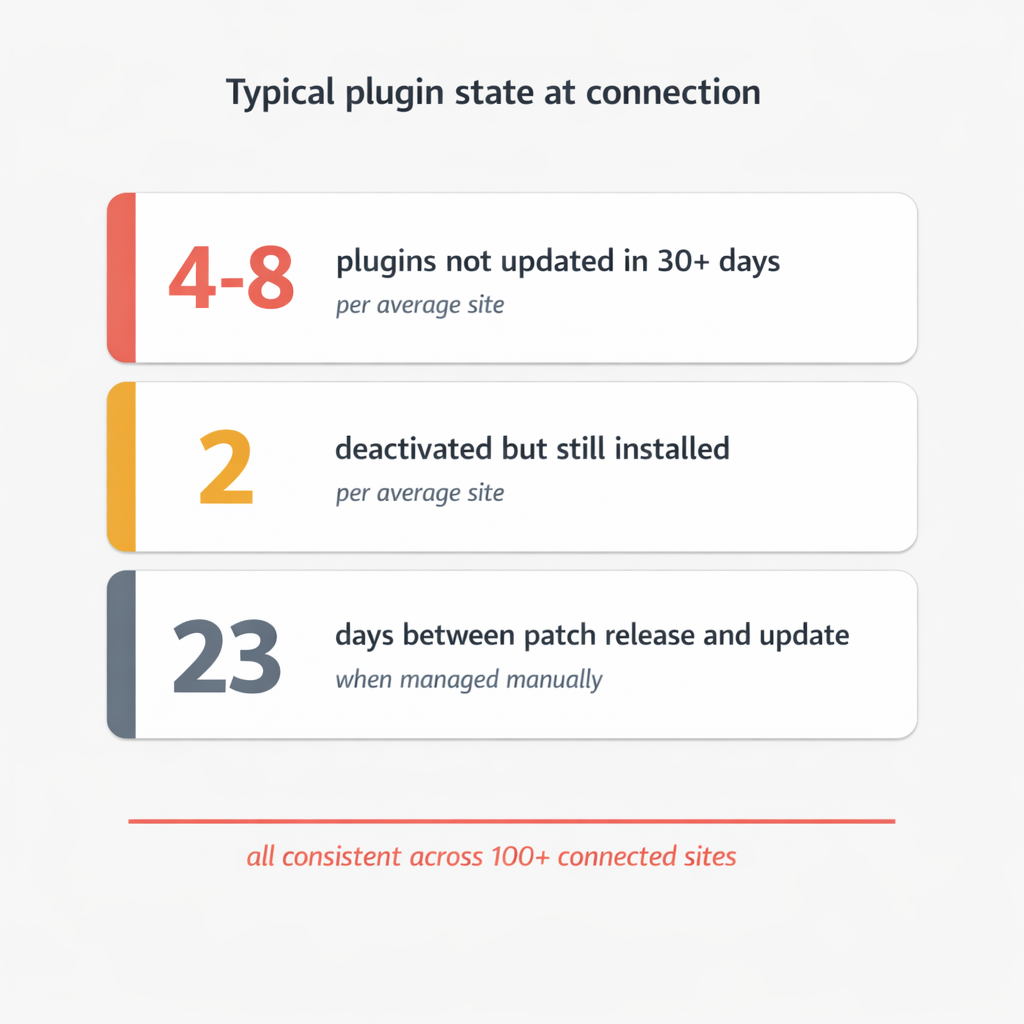
When vLake connects to a WordPress site, the first thing it does is scan everything. Blogs, pages, media, taxonomy, and plugins. Every plugin installed on the site gets catalogued: name, version, active status, auto-update setting, and whether there’s a newer version available.
The plugin picture on most sites is not good.
The typical site we connect has between four and eight plugins that haven’t been updated in the past 30 days. At least one or two are deactivated but still installed, sitting there doing nothing except adding weight to the codebase and not receiving security patches. A significant number have auto-updates disabled, meaning nobody is monitoring them actively.
The pattern makes sense when you think about it. Plugin updates require attention and carry risk. Attention is scarce. Risk is uncomfortable. So updates get deferred. Deactivated plugins don’t obviously break anything, so they never get cleaned up. Auto-updates got turned off after one bad experience years ago and never got turned back on.
The result is a plugin ecosystem that drifts further from current with every week that passes. Not dramatically, not visibly, but consistently.
What the Automated Approach Actually Looks Like
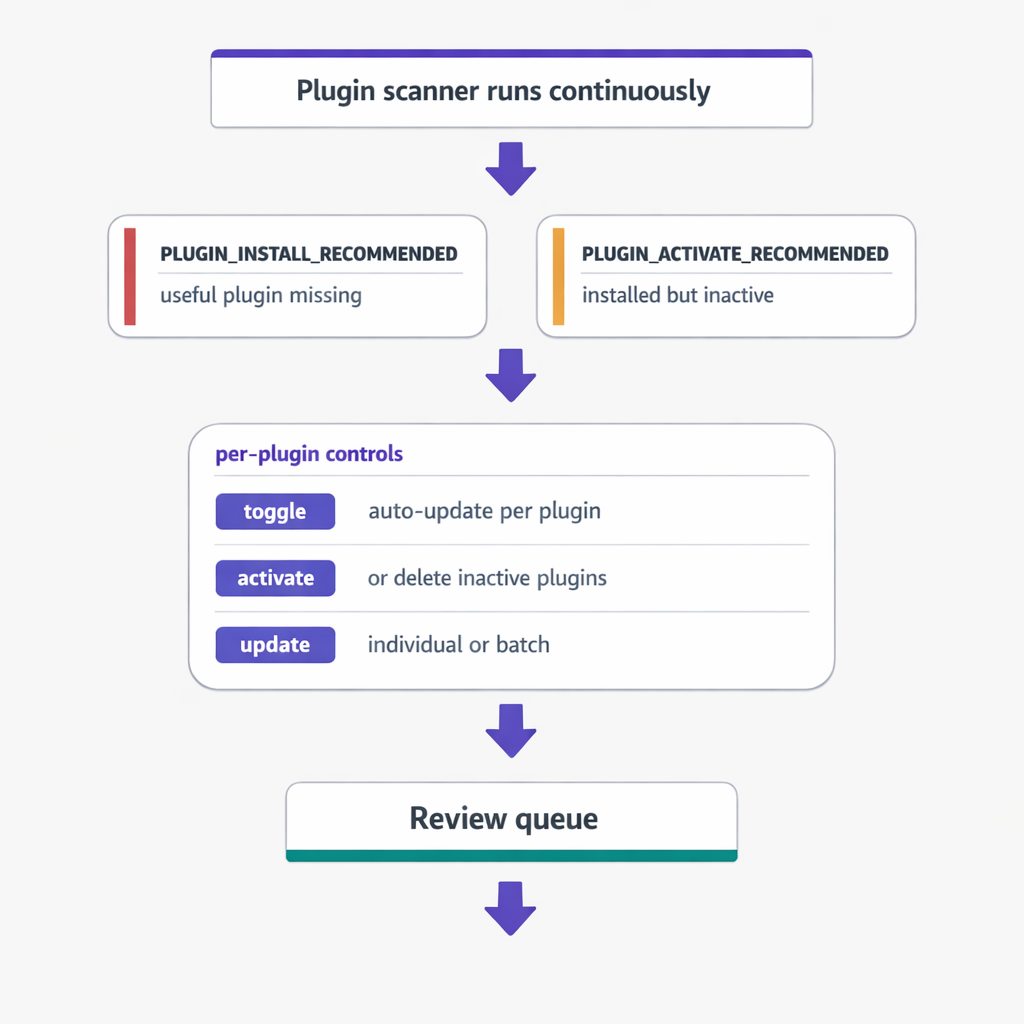
The plugin scanner in vLake runs on a regular cycle and creates recommendations for anything that needs attention. Two types matter most.
`PLUGIN_INSTALL_RECOMMENDED` flags when a commonly useful plugin is missing from the site. This is proactive. If a site doesn’t have a security plugin running, or is missing a caching layer that would meaningfully improve performance, the engine flags it. I review the recommendation and either queue the install or dismiss it.
`PLUGIN_ACTIVATE_RECOMMENDED` flags deactivated plugins that are installed but doing nothing. These are the quiet liabilities. Most of the time, the right call is to either activate them properly or delete them entirely. The recommendation surfaces the decision so it doesn’t sit in a grey zone forever.
Beyond recommendations, the system gives per-plugin controls. Toggle auto-update on or off per plugin. Activate or deactivate. Trigger a version update individually or in batches. Every action is tracked through the workflow board, so I can see exactly what changed, when, and why.
The key difference from manual maintenance is the monitoring loop. I don’t have to remember to check. The scanner runs whether I’m paying attention or not. If a new version drops and auto-update isn’t enabled, it gets flagged. If a plugin gets deactivated without a corresponding delete, it gets flagged. The work doesn’t queue up silently. It surfaces.
Before and After: One Client Site
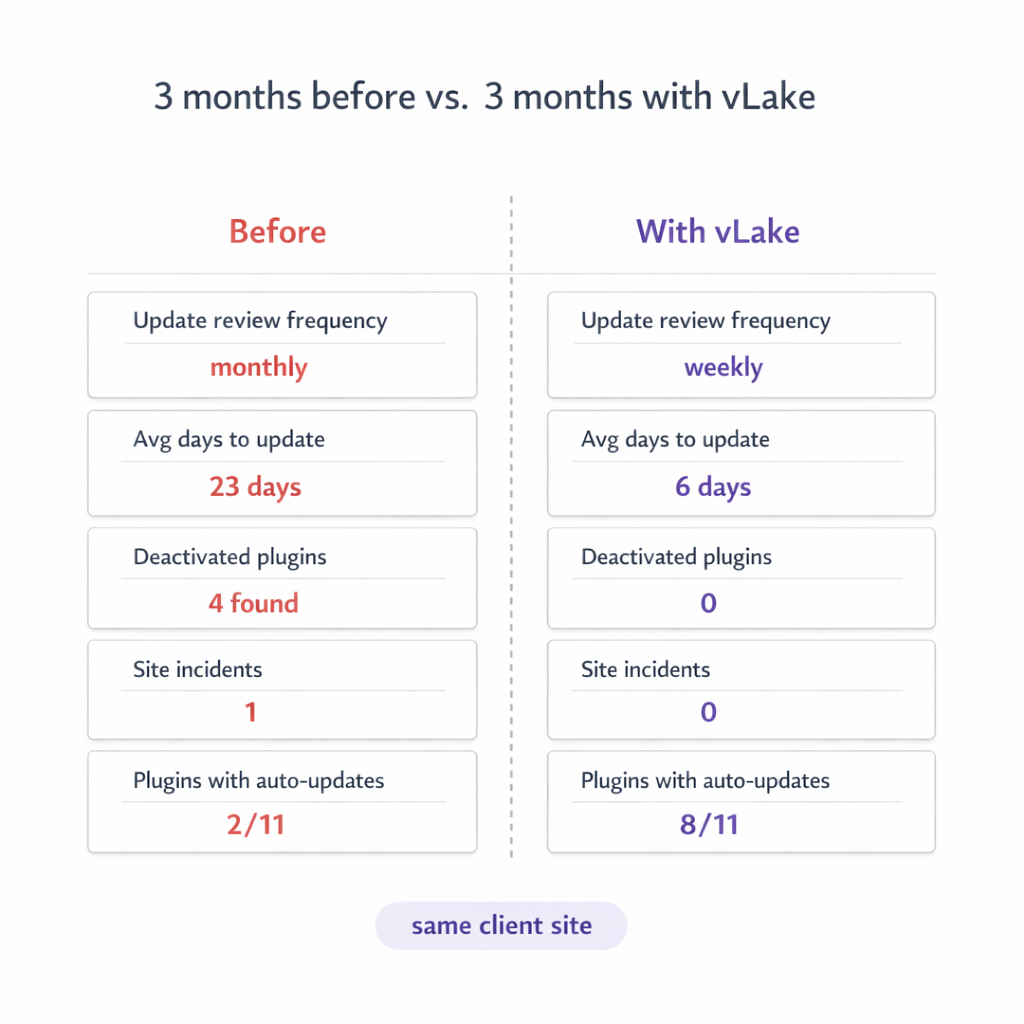
Three months before vLake:
- Plugin updates reviewed per month: when we remembered, roughly once a month
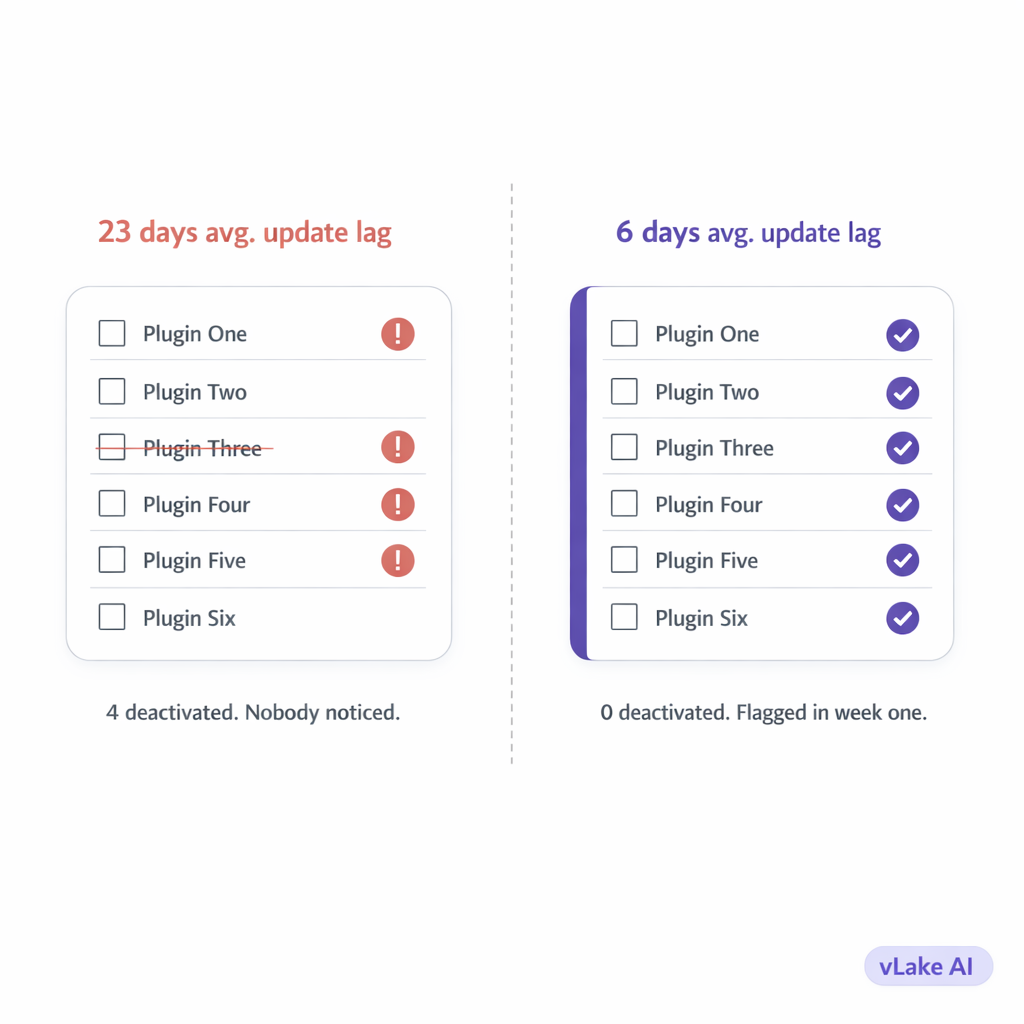
- Average time between version release and our update: 23 days
- Plugins deactivated but still installed: 4 (we didn’t notice)
- Sites incidents related to plugins: 1 (a conflict after a batch update that took two hours to diagnose)
- Plugins with auto-updates enabled: 2 out of 11
Three months with vLake:
- Plugin updates reviewed per month: every week, part of the recommendation queue review
- Average time between version release and update: 6 days
- Plugins deactivated but still installed: 0 (flagged and cleaned up in week one)
- Site incidents related to plugins: 0
- Plugins with auto-updates enabled: 8 out of 11 (we reviewed each one and made a deliberate decision)
The 23-day gap on update lag surprised me when I saw the number. Three weeks between a security patch releasing and us applying it. On a live client site. That’s not an edge case, that’s a pattern. The automation didn’t change our intent. It changed our execution.
Why This Matters More Than It Sounds
Plugin management isn’t the most interesting part of running a WordPress site. That’s precisely the problem.
The uninteresting maintenance tasks are the ones that get skipped. Blog content gets attention because clients ask about it. Design gets attention because it’s visible. Plugins sit in the background doing their job invisibly until they don’t, at which point the failure is also invisible until something breaks.
Automation fixes this not by making plugin management more interesting but by removing the dependency on interest. The scanner runs. The recommendations appear. I spend five minutes reviewing them instead of twenty minutes trying to remember when I last looked at the plugin list.
The security argument is real but abstract until something goes wrong. The workflow argument is immediate. Manual plugin management takes time, requires context, and breaks down across multiple sites. Automated monitoring turns it into a five-minute review that happens consistently.
We stopped doing it manually because manually wasn’t working. Not dramatically. Quietly. And quiet failures in WordPress plugin security are the worst kind.